
Able Particle Tracker2.1 - Download
You'll be able to download in few seconds.
Publisher Description
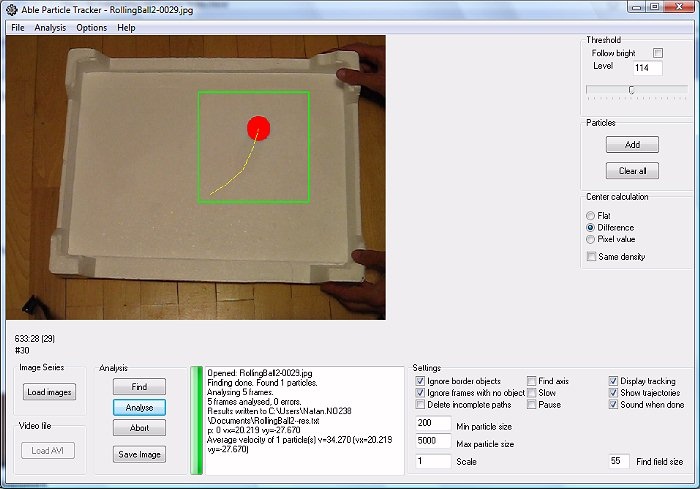
Able Particle Tracker (APT) is advanced particle tracking software. Tracking objects in video sequences is a sophisticated problem and a variety of special solutions have been produced, but typically they are strongly dependent on the context of the particular experiment. APT is a general package for particle tracking that is appropriate both for tracking of nanometer sized proteins as well for tracking of huge objects, such as planet or stars and for everything in between (droplets, colloidal particles, biological cells, animals, humans, vehicles etc.) Able Particle Tracker is user friendly program and can be mastered in 5 minutes! The whole tracking process consists of a few simple steps: opening the first image of a sequence, selecting particles/criteria for tracking and then fully automated tracking of the particles in subsequent images. The results (particle trajectories) are written in a text file which can be imported into other programs (such as Excel, Origin, Matlab, IDL...) for further analysis. APT can track multiple particles at the same time. It is fast no matter whether you simultaneously track one or 5000 particles.
About Able Particle Tracker
This Science program is available in English. It was last updated on 29 September, 2026. Able Particle Tracker is compatible with the following operating systems: Windows.
The company that develops Able Particle Tracker is Mu Labs. The latest version released by its developer is 2.1.
The download we have available for Able Particle Tracker has a file size of 15.7 MB. Just click the green Download button above to start the downloading process. The program is listed on our website since 2012-11-16 and was downloaded 0 times. We have already checked if the download link is safe, however for your own protection we recommend that you scan the downloaded software with your antivirus. Your antivirus may detect the Able Particle Tracker as malware if the download link is broken.
How to install Able Particle Tracker on your Windows device:
- Click on the Download button on our website. This will start the download from the website of the developer.
- Once the Able Particle Tracker is downloaded click on it to start the setup process (assuming you are on a desktop computer).
- When the installation is finished you should be able to see and run the program.
Program Details
System requirements
Download information
Pricing
Version History
version 2.1
posted on 2012-11-16
Disclaimer
External Download
We do not host Able Particle Tracker on our servers. We did not scan it for viruses, adware, spyware or other type of malware. This app is hosted by the software publisher and passed their terms and conditions to be listed there. We recommend caution when installing it.
The external download link for Able Particle Tracker is provided to you by apps112.com without any warranties, representations or guarantees of any kind, so access it at your own risk.
If you have questions regarding this particular app contact the publisher directly. For questions about the functionalities of apps112.com contact us.
